Installing Ajenti 2.0 Alpha

IMPORTANT NOTE

Please avoid publishing any info about this publicly, would you kindly? It’s not the time for that yet.

Installing this PoC

I wouldn’t recommend installing it alongside Ajenti 1.x. Using a VM is a good idea.

Supported systems are:

  • Debian 6, 7, and probably above
  • Ubuntu Precise, Utopic and probably between and above
  • CentOS 6, 7, and probably above and also RHEL (probably)

Quick install script:

curl https://raw.githubusercontent.com/ajenti/ajenti/master/scripts/install.sh | sudo bash

This script installs native dependency packages (yum/apt), the PIP package for ajenti and creates the initscript.

  • Panel listens at https://…:8000.
  • Use root and your root password to login.
  • Config: /etc/ajenti/config.yml
  • Initscript/job/service/unit name is ajenti.
  • Depending on your system, use /etc/init.d/, service, initctl, systemctl to manage the service.

Support

Please post issues in comments here: https://github.com/ajenti/ajenti/issues/1 You can also send me an email: e@ajenti.org or reach me on Skype: john.pankov

Thank you again for reading this far.
Installing AJENTI on new Debian VPS in 5 minutes

DEBIAN 7 minimal:

apt-get update

apt-get install mc htop iftop iotop

mcedit .bashrc

alias apt=’apt-get’
alias ls=’ls -F –color=auto’
alias iftop=’iftop -B’

source ~/.bashrc

AJENTI:
wget -O- –no-check-certificate https://raw.github.com/ajenti/ajenti/1.x/scripts/install-debian.sh | sh

AJENTI V:
apt-get install ajenti-v ajenti-v-nginx ajenti-v-mysql ajenti-v-php-fpm php5-mysql ajenti-v-ftp-pureftpd exim4 php5-gd
service ajenti restart

Edit my.conf:
skip-innodb
default_storage_engine=MyISAM
service mysql restart

(Don’t upgrade PHP)

Connect + change pass.

Create new website + add folder + add content – PHP FastCGI (this will set the php5-fpm).

Installing PHP 5.6 – Debian

PHP:
php5-fpm -v
mcedit /etc/apt/sources.list

To install PHP 5.6 on Wheezy, you can add this repo:
echo “deb http://packages.dotdeb.org wheezy-php56 all” >> /etc/apt/sources.list.d/dotdeb.list
echo “deb-src http://packages.dotdeb.org wheezy-php56 all” >> /etc/apt/sources.list.d/dotdeb.list

Add the key:
wget http://www.dotdeb.org/dotdeb.gpg -O- |apt-key add –

And install PHP:
apt-get update

List of installed packages:
apt –installed list

apt-get install php5 php5-cli php5-fpm ….. (or whatever package you might need)

(Install opcache.php – wget https://raw.github.com/rlerdorf/opcache-status/master/opcache.php)

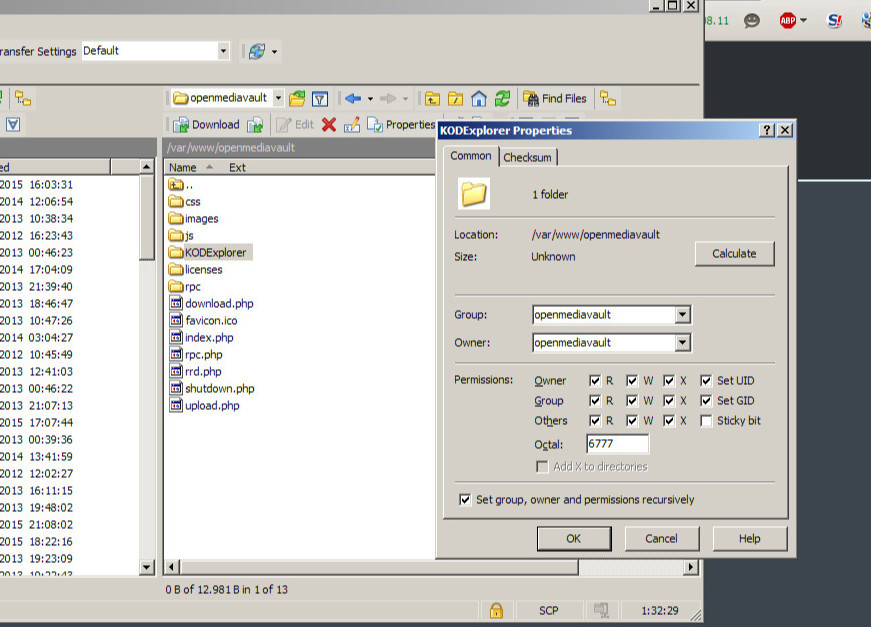
KODExplorer setup

KODExplorer setup
(http://forums.openmediavault.org/index.php/Thread/7502-Alternative-for-eXtplorer/)

apt-get install php5-gd

wget https://github.com/kalcaddle/KODExplorer/archive/master.zip

unzip master.zip

move files to desired folder

Open in browser

chmod -777 … (relevant folders)

config/config.php edit

define(‘USER_PATH’, DATA_PATH .’User/’); //用户目录 /media/3A8466D584669365

replace

define(‘USER_PATH’, ‘/media/XXXXXXXXX/User/’);

Profit!

Linux Iptables Just Block By Country

You can block traffic at both Apache or iptables level. I recommend iptables to save some resources. First, you need to get list of netblocks for each country. Simply visit this page and download IP block files are provided in CIDR format. Use the following shell script:

WARNING!People from other countries may use proxy server or think of spoofing their IP address. In such case, this may not work and it will only protect your box from automated scans or spam.
#!/bin/bash
# Purpose: Block all traffic from AFGHANISTAN (af) and CHINA (CN). Use ISO code. #
# See url for more info - http://www.cyberciti.biz/faq/?p=3402
# Author: nixCraft <www.cyberciti.biz> under GPL v.2.0+
# -------------------------------------------------------------------------------
ISO="af cn"
 
### Set PATH ###
IPT=/sbin/iptables
WGET=/usr/bin/wget
EGREP=/bin/egrep
 
### No editing below ###
SPAMLIST="countrydrop"
ZONEROOT="/root/iptables"
DLROOT="http://www.ipdeny.com/ipblocks/data/countries"
 
cleanOldRules(){
$IPT -F
$IPT -X
$IPT -t nat -F
$IPT -t nat -X
$IPT -t mangle -F
$IPT -t mangle -X
$IPT -P INPUT ACCEPT
$IPT -P OUTPUT ACCEPT
$IPT -P FORWARD ACCEPT
}
 
# create a dir
[ ! -d $ZONEROOT ] && /bin/mkdir -p $ZONEROOT
 
# clean old rules
cleanOldRules
 
# create a new iptables list
$IPT -N $SPAMLIST
 
for c  in $ISO
do
	# local zone file
	tDB=$ZONEROOT/$c.zone
 
	# get fresh zone file
	$WGET -O $tDB $DLROOT/$c.zone
 
	# country specific log message
	SPAMDROPMSG="$c Country Drop"
 
	# get 
	BADIPS=$(egrep -v "^#|^$" $tDB)
	for ipblock in $BADIPS
	do
	   $IPT -A $SPAMLIST -s $ipblock -j LOG --log-prefix "$SPAMDROPMSG"
	   $IPT -A $SPAMLIST -s $ipblock -j DROP
	done
done
 
# Drop everything 
$IPT -I INPUT -j $SPAMLIST
$IPT -I OUTPUT -j $SPAMLIST
$IPT -I FORWARD -j $SPAMLIST
 
# call your other iptable script
# /path/to/other/iptables.sh
 
exit 0

Save above script as root user and customize ISO variable to point out country name using ISO country names. Once done install the script as follows using crontab:
@weekly /path/to/country.block.iptables.sh
To start blocking immediately type:
# /path/to/country.block.iptables.sh
And you are done with blocking the whole country from your server.